Introduction
The MSEC is a robust mobile security platform designed to protect your mobile games/apps from common hacking/cheating methods and security vulnerabilities. MSEC is built upon:
MSEC SDKs: A bunch of client security libraries (including MsecNativeSdk, MsecFlutterSdk, MsecReactNativeSdk, MsecUnitySdk...), which will be integrated into mobile games or apps to collect and analyze security information from devices without affecting the operation of the apps or games.
MSEC Services: A bunch of backend services which will analyze collected information from devices and send security alerts to the installed mobile apps or games as well as to their backend services.
MSEC Dashboard: A portal for game and app publishers, which will help them check collected information and identify potential security vulnerabilities for their apps and games.
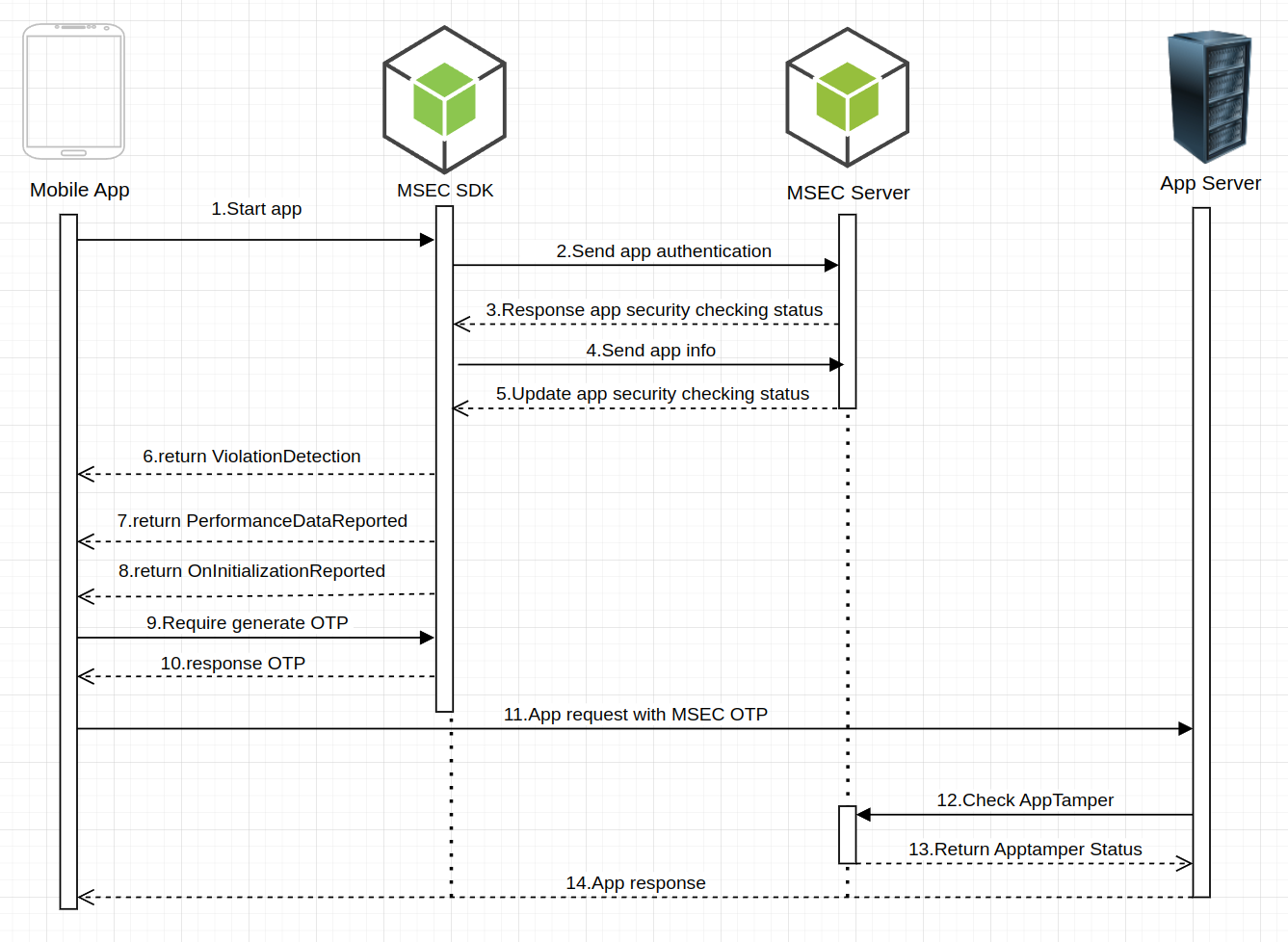
MSEC Platform Integration Process.
Security Features
Rooted/Jailbroken Device Detection: Detects devices which have been rooted (Android) or jailbroken (iOS).
Emulator Detection: Chechs whether a game/app is running in an emulator environment.
Debuggable Application Detection: Checks whether a running game/app is debuggable.
Application Tampering / Reverse-Engineering Detection Detects modifications to a game/app's code.
SSL Certificate Verification Verifies SSL certificates to prevent a game/app from Man-In-The-Middle (MITM) attacks.
Memory Hooking Detection Detects whether a game/app runtime memory is hooked using tools such as Frida, Xposed, Objection, Game Guardian, etc.
Platform Support
iOS: Minimum deployment target: 13.0
Android: Minimum SDK version: 21
Service Plans
MSEC offers two service plans:
MSEC Onsite Protection Plan support:
Rooted/jailbroken device detection.
Emulator detection.
Debuggable Application detection.
Application tampering/reverse-engineering detection.
MSEC Remote Protection Plan offers full protection features:
Rooted/jailbroken device detection.
Emulator detection.
Debuggable Application detection.
Application tampering/reverse-engineering detection.
SSL Certificate Verification.
Memory hooking detection.
NOTES: If you require more secure protection, consider upgrading from the Onsite Protection Plan to the Remote Protection Plan. Click for more details
Getting Started
Step 1: Register an MSEC account
You need an MSEC account to be able to integrate MSEC SDK into your games/apps.
Visit MSEC Dashboard at : https://dash.msecsys.com/
Choose Sign in with Google.
After signing in, the screen will show you the studio/company creation interface, select the Admin role then enter your studio/company information.
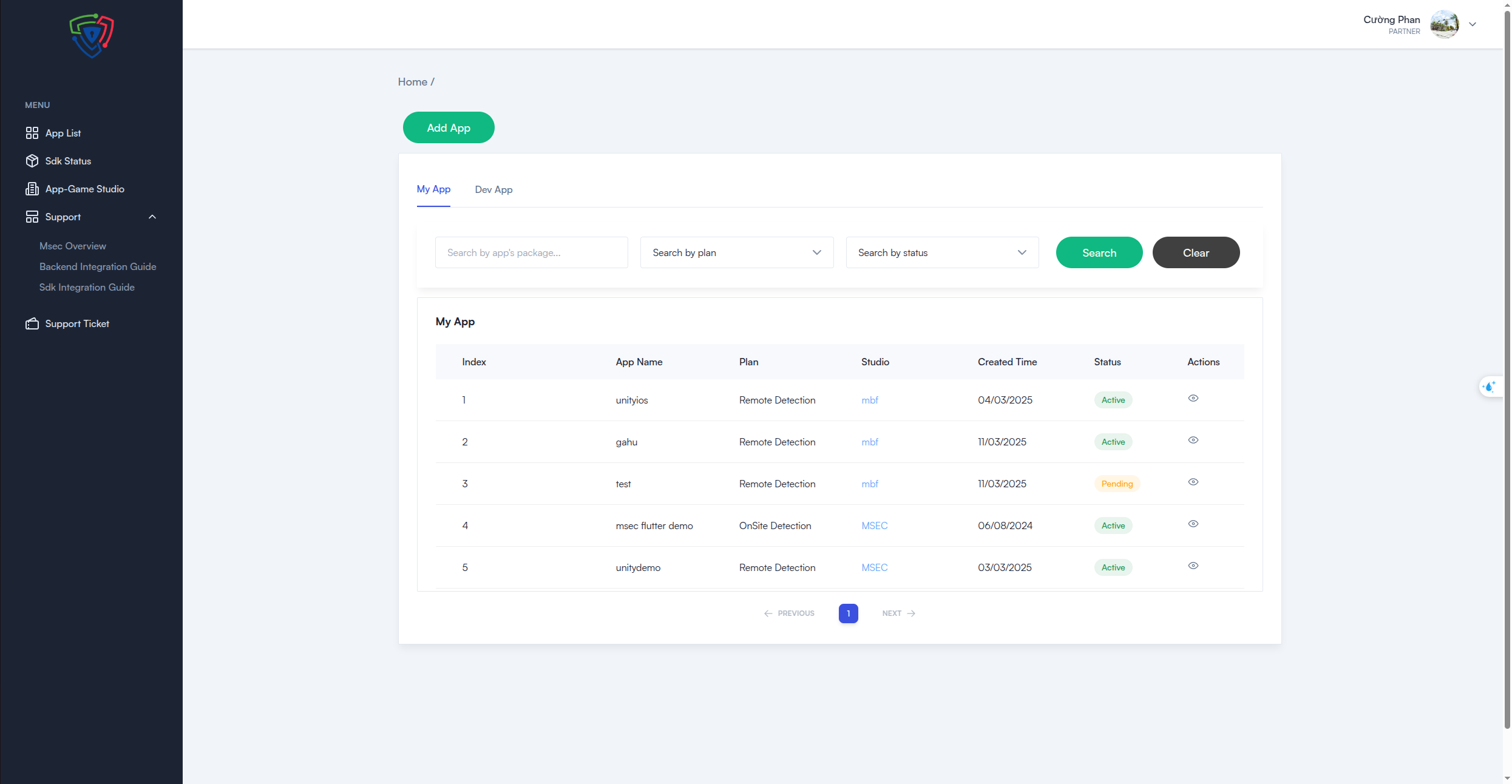
Dashboard After Signing In
Step 2: Register your first app with MSEC
Click on the green "Add app" button at the top left to and fill in the required information:
App Name: Enter the name of the app.
Studio (Company Name): Select the studio name when you registered
You then select the platform, which can be either iOS or Android, and enter the package name.
After that, when you submit the app, it will be in a pending state, awaiting approval from MSECSDK.
You will receive a notification email once it is approved (sent to the studio email you registered with).
Typically, when registering, select Remote Detection (detects violations on both the client app and server MSEC response violation values).
The OnSite option only detects violations on the client side.
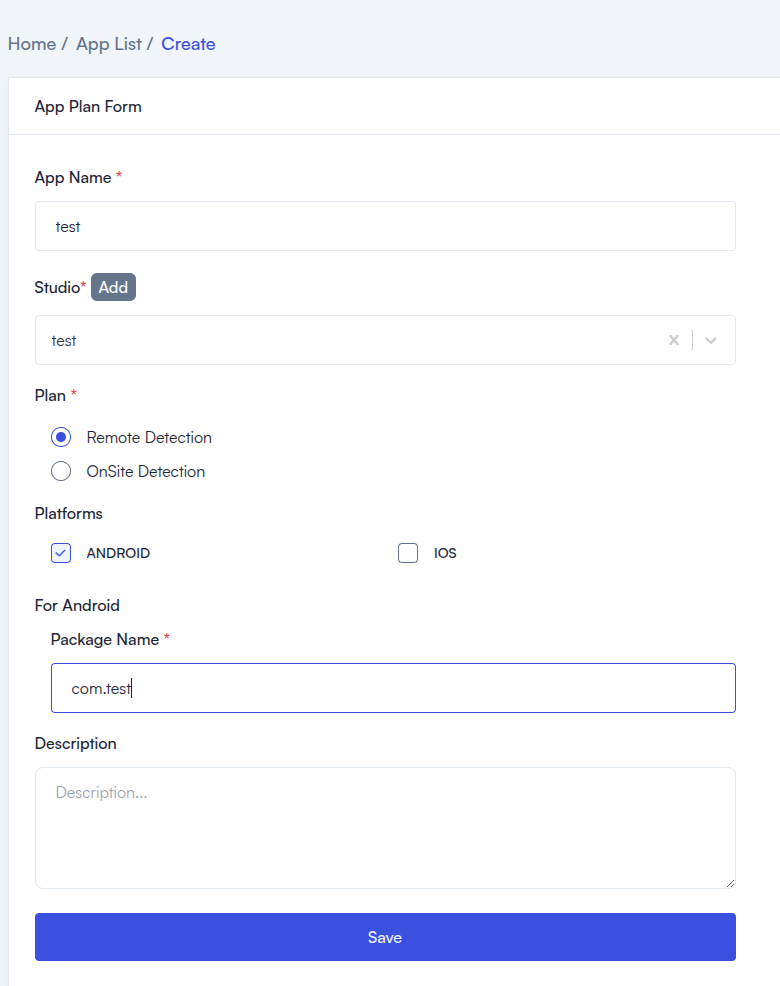
App Information Form
After that, when the app is registered, its status will be Pending, and you will need to wait for approval from MSECSDK. You will receive a notification email at the studio email you registered with.
Step 3: Update your app information
Once your game/app has been approved, you need to update your app information. Follow these steps:
Navigate to the Dashboard / App List, where you can see the list of registered apps.
Click View Detail on the app you want to add or edit its information.
Select App Info.
Select Platform, App Version and Installation Source List then follow next steps.
Notes:
MSEC only support getting your app's latest release information from Google Play Store
If your app latest releason Google Play Store has a version eg: 80(1.1.2), your App Version should be 1.1.2, and Version Code should be 80
Installation Source List is used to determines the allowed installation sources. For example, if you only allow your app to be installed from the Google Play Store, any installation through the Android Package Installer will be flagged as tampering application
Contact Us
GitHub: MSEC GitHub
Discord: MSEC Discord
Email: [email protected]